

Table of Contents
- Why Custom T-Shirts Fade (and What's Actually Happening to the Ink)
- How to Wash Screen Printed Shirts the Right Way
- Air Drying vs Machine Drying Custom Apparel
- Preventing Screen Print Cracking and Peeling
- Stain Removal for Printed Areas Without Wrecking the Design
- Storage and Sunlight: How to Prevent Custom T-Shirts from Fading Long-Term
- Conclusion
Last Updated: August 26, 2026
Most people don't realize their custom t-shirt starts losing vibrancy the moment it hits a hot wash cycle. The good news is that custom t-shirts fading is almost entirely preventable. Below, we'll walk through exactly what causes it and how to stop it, from the wash cycle all the way to how you fold and store your shirts.
Why Custom T-Shirts Fade (and What's Actually Happening to the Ink)
Custom t-shirts fading is a physical and chemical process, not just a quality problem. Understanding what's actually happening helps you make smarter choices about how you care for your gear.
Screen printed shirts use ink that bonds to the surface fibers of the fabric. That bond is strong when the ink is properly cured during production, but it's not indestructible. Heat, mechanical agitation, and harsh chemicals all work against it over time.
Here's what's going on at the material level:
- UV exposure breaks down the pigment molecules in the ink. Direct sunlight is the fastest way to kill vibrancy in a graphic tee, even without washing it.
- Hot water and high heat cause synthetic fibers and cotton blends to expand and contract. This repeated movement stresses the ink layer, leading to print cracking and peeling.
- Mechanical agitation from a washing machine physically scrubs the surface of the fabric. Every cycle creates friction, and friction causes fabric abrasion that wears down the ink.
- Detergent residue and bleach-based products attack the chemical bonds in screen printed ink, stripping color and dulling the print over time.
- Enzymatic detergents, which are common in standard laundry products, are designed to break down organic matter. They're effective on stains, but they also degrade certain ink types if used repeatedly.
The print cracking you see on older shirts usually starts at the edges of the design, where the ink layer is thinnest. Once cracking begins, it accelerates. Prevention is far easier than repair.
According to the American Association of Textile Chemists and Colorists, color fastness is one of the primary performance standards for printed textiles, and wash temperature is one of the biggest variables that affects it.
How to Wash Screen Printed Shirts the Right Way
Washing is where most of the damage happens, and most of it is avoidable with a few consistent habits.
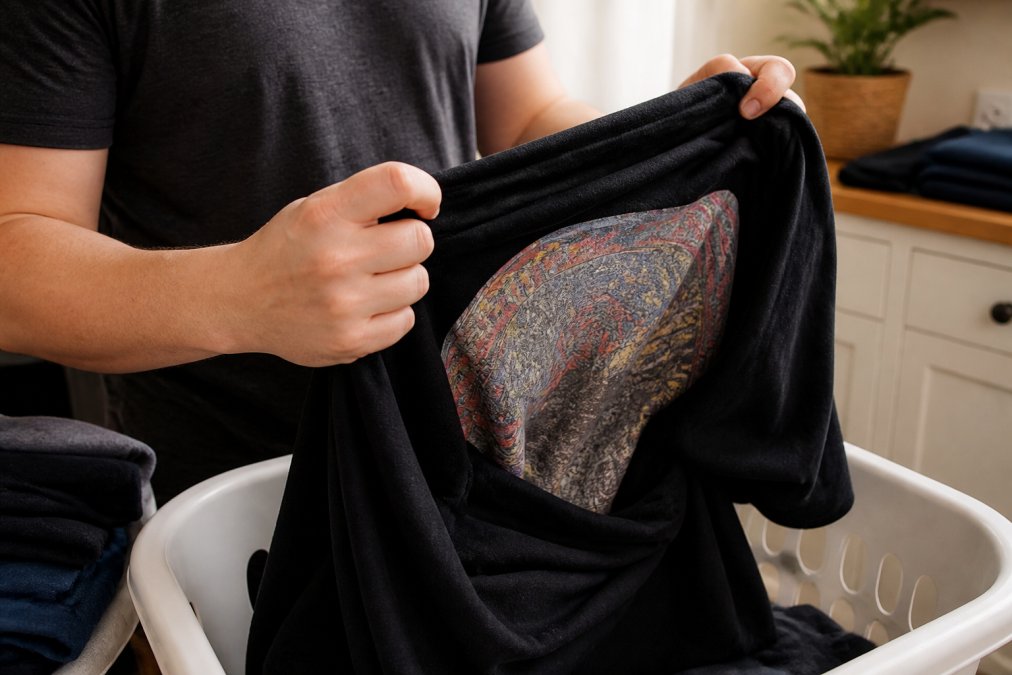
Turn Shirts Inside Out Before Every Wash
Turning shirts inside out before washing is the single most effective thing you can do to protect the print. This is not optional if you care about longevity.
When a shirt goes through a wash cycle right-side out, the printed surface is in direct contact with other garments, the drum, and the full force of the water flow. That's maximum mechanical agitation against the most vulnerable part of the shirt.
Flipping it inside out means the print faces inward and away from friction. The fabric takes the abrasion instead of the ink. This one habit alone can significantly extend the life of your design.
Make it automatic. Every time you take a graphic tee off, flip it inside out before it goes in the hamper. By the time it reaches the wash, it's already protected.
Choose the Right Detergent and Skip Fabric Softener
Most standard detergents are too aggressive for screen printed shirts. Look for a detergent labeled "gentle," "color-safe," or "free and clear." These formulas skip the bleach, optical brighteners, and heavy enzymatic compounds that break down ink over time.
Fabric softener is a common mistake. It leaves a coating on the fabric fibers that, over repeated washes, creates a barrier between the ink and the shirt. This leads to peeling and reduces the vibrancy of the print. Skip it entirely.
A few practical rules:
- Use the recommended amount of detergent, or slightly less. Detergent residue left in the fabric is abrasive and dulls color over time.
- Never use bleach or bleach-based stain removers on printed areas.
- Cold water detergents are formulated to work at lower temperatures, making them a natural match for this wash method.
Cold Water Cycles and Delicate Settings
Cold water cycles are non-negotiable for screen printed shirts. Hot water causes the cotton blend or synthetic fibers in the shirt to expand, which puts direct stress on the ink layer. Over time, this is what causes that cracked, aged look even on shirts that haven't been worn much.
Set your machine to a cold water, delicate cycle. The delicate setting reduces spin speed and mechanical agitation, which means less friction against the print. A standard or heavy-duty cycle is overkill for a t-shirt and genuinely shortens the life of the design.
Sort your wash load by fabric weight as well. Washing graphic tees with heavy items like jeans or towels means more tumbling friction in the drum. Keep lighter garments together.
Air Drying vs Machine Drying Custom Apparel
Air drying is the clear winner for custom apparel. The heat from a dryer is one of the most consistent causes of print cracking, shrinkage, and color loss in screen printed shirts.

The drum of a dryer creates two problems simultaneously: heat and tumble dry agitation. High heat causes the ink to expand and contract repeatedly, weakening the bond between the print and the fabric. The tumbling action adds mechanical stress on top of that.
If you must use a dryer, use the lowest heat setting available and remove the shirt while it's still slightly damp. Finish drying flat or on a hanger.
Air drying on a flat surface or a drying rack is ideal. Hang drying works too, but avoid direct sunlight. UV exposure will fade the ink even during the drying process, particularly with darker or more saturated colors.
| Drying Method | Effect on Print | Recommendation |
|---|---|---|
| Tumble dry (high heat) | Accelerates cracking and peeling | Avoid |
| Tumble dry (low heat) | Moderate risk over time | Use sparingly |
| Air dry (direct sunlight) | UV exposure fades color | Avoid |
| Air dry (indoors, flat) | Minimal stress on print | Best option |
| Air dry (hanger, shade) | Low risk | Good option |
The difference in textile longevity between air drying and regular machine drying is significant over the course of a garment's life. The Textile Exchange fiber and materials guide notes that heat management during care is one of the primary factors in extending the usable life of printed apparel.
Preventing Screen Print Cracking and Peeling
Cracking and peeling are the most visible signs of print damage, and they're almost always the result of cumulative heat exposure and improper washing. Preventing screen print cracking starts before the shirt ever goes in the wash.
The most common mistake is treating a graphic tee the same way you'd treat a plain cotton shirt. The print changes the care equation entirely.
Here's what actually causes cracking:
- Repeated high-heat drying. This is the leading cause. The ink curing process that happens during production creates a flexible bond, but repeated heat cycles harden and brittle that layer over time.
- Washing right-side out. Direct abrasion against the print during every wash cycle gradually wears down the ink surface.
- Overstretching. Pulling a shirt over your head aggressively, especially when it's damp, stretches the fabric and the ink together. The fabric recovers; the ink doesn't always.
- Storing folded with the print compressed. Constant pressure on the same crease lines can cause micro-fractures in the ink layer.
The fix for most of these is already covered in the washing and drying sections. The additional step is to handle the shirt gently when it's wet, since that's when the fabric and ink are most vulnerable to stretching and stress.
Stain Removal for Printed Areas Without Wrecking the Design
Stain removal is where well-intentioned care goes wrong fast. The instinct to scrub hard and use the strongest product available is the opposite of what a printed shirt needs.
The core rule: treat stains from the inside of the fabric when possible. If you can push the stain out rather than driving it deeper into the print, you reduce the risk of spreading the stain into the ink layer.
For most common stains on graphic tees, this approach works:
- Act quickly. Fresh stains are far easier to remove without aggressive treatment. Blot (don't rub) the stain immediately to absorb as much as possible.
- Use a small amount of gentle, color-safe detergent. Apply it directly to the stain, not to the print itself if you can avoid it.
- Work from the edges inward. This prevents the stain from spreading outward into clean fabric or into the design.
- Rinse with cold water. Hot water sets many stains and causes the fabric to contract around the stain.
- Avoid enzymatic stain removers on the printed area. These products are designed to break down organic compounds, which can include certain ink types used in heat transfer and screen printing.
Never use bleach anywhere near a printed design. Even a small amount of bleach will strip the color from the ink and create a permanent, uneven patch.
For oil-based stains, a small amount of dish soap applied gently can help break down the grease before a cold wash. Test any product on an inconspicuous area of the shirt first.
Storage and Sunlight: How to Prevent Custom T-Shirts from Fading Long-Term
Preventing custom t-shirts from fading isn't just about the wash cycle. How you store your shirts between wears matters more than most people expect.
The biggest long-term threats to a screen printed shirt in storage are UV exposure and sustained pressure on the print. Both are easy to avoid with a few deliberate habits.
Avoid storing shirts in direct sunlight. A shirt folded on an open shelf near a window is being slowly faded by UV exposure every day, even without being worn or washed. Store graphic tees in a drawer, a closed wardrobe, or a dark shelf.
Fold with the print facing out, not compressed. When you stack shirts with the print face-down under other items, the weight creates constant pressure on the ink. Over time, this contributes to micro-cracking. Fold the shirt so the design sits on top, or hang it instead.
Hanging is often the better option for long-term storage. A shirt on a hanger keeps the fabric relaxed and the print free from pressure. Use a wide-shouldered hanger to avoid stretching the collar area.
According to the American Apparel and Footwear Association's garment care resources, proper storage is one of the most underrated factors in extending the life of printed and dyed garments.
Ironing and Heat: What's Safe and What Destroys Prints
Ironing a screen printed shirt directly on the design will damage it. This is one of those rules with almost no exceptions.
Direct heat from an iron melts and distorts the ink, particularly with heat transfer prints. Even at lower temperatures, repeated direct contact with an iron will cause the print to stick to the iron plate, peel away from the fabric, or develop a shiny, plasticky surface.
Safe ironing practices for graphic tees:
- Iron inside-out. Flip the shirt and iron the reverse side of the fabric. The heat passes through to smooth wrinkles without touching the print directly.
- Use a pressing cloth. If you need to iron the front of the shirt, place a thin cotton cloth between the iron and the print. This diffuses the heat and prevents direct contact.
- Avoid steam directly on the print. Steam can reactivate adhesives in heat transfer prints and cause lifting or bubbling.
- Keep the iron moving. Never leave a hot iron sitting in one spot on any part of the shirt.
A garment steamer used at a distance is a safer option for removing wrinkles from printed shirts, since it doesn't apply direct pressure or sustained heat to any one spot.
The Federal Trade Commission's care labeling requirements for textiles require garment manufacturers to provide care instructions that reflect the actual needs of the fabric and any applied finishes, including screen printing. Check the care label on your shirt as a baseline, then apply these additional precautions for the printed areas specifically.
Frequently Asked Questions
Q: Should I turn my custom t-shirts inside out before washing?
A: Yes, every single time. Turning a shirt inside out before washing shields the printed surface from direct mechanical agitation inside the drum. Fabric abrasion between garments is one of the fastest ways to wear down screen printed ink and reduce color vibrancy. It also limits UV exposure during drying. This one habit alone extends the life of graphic tees significantly, and it costs nothing extra.
Q: What is the best way to wash graphic tees to prevent cracking?
A: Use a cold water cycle on the delicate setting, turn the shirt inside out, and choose a mild detergent free of bleach and enzymes. Enzymatic detergents break down organic material, which includes the binders in screen printed ink. Avoid high spin speeds, which increase mechanical agitation and stress the print. Washing in a small, sorted load also reduces fabric-on-fabric friction that causes print cracking over time.
Q: Can I iron screen-printed shirts?
A: You can, but never iron directly on the printed area. Heat transfer from a hot iron can melt or warp screen printed ink, causing cracking and peeling. If you need to smooth out wrinkles, turn the shirt inside out and iron on a low setting on the reverse side of the print. Alternatively, use a pressing cloth as a barrier. Steam settings are generally safer than direct dry heat on synthetic fiber blends.
Q: Does vinegar help stop custom t-shirts from fading?
A: White vinegar added to the rinse cycle can help lock in color fastness by neutralizing detergent residue left in the fabric, which can dull vibrancy over time. Add roughly half a cup to the fabric softener compartment. It won't restore faded ink, but as a preventive measure during regular washing it helps maintain the original color of cotton blend garments. It's not a substitute for proper cold-water washing habits.
Custom t-shirts fading before their time is frustrating, especially when the shirt carries real meaning. The care habits covered here, cold water cycles, inside-out washing, air drying away from sunlight, and smart storage, work together to protect both the fabric and the print over the long haul. At Totally Terrific Tshirts, every design is crafted to start conversations and tell your story, and that story deserves to last. Explore the full collection and find a shirt worth protecting.
This article was written using GrandRanker